Why Gentoo?
The task is to have a C++ Nvidia CUDA development environment on Linux for AI development and research with the latest versions of libtorch aka PyTorch, OpenCV, and Arcade Learning Environment (ALE), with both libtorch and OpenCV having native CUDA GPU hardware support, and building using CMake. Linux is ideal for such, and in this case, is used on a headless Linux server, where no graphics are running, which makes the Nvidia CUDA GPU hardware dedicated for any AI tasks.
Setting up a C++ AI development environment using any versions of the various components is difficult and doing such with the latest versions can be extremely challenging. This was attempted at first under Ubuntu via both Python's pip and Conda package managers. Why not use the Linux distro's package manager? Well most do not offer or support such, and the common way ends up being pip or conda, outside of the distro package manager. Even Gentoo requires a mix with usage of Python's virtual environment venv, for additional Python packages for use in Python.
pip would only provide a Python environment which is unsuitable for C++ development. The other
downside to pip is you get support for much more than you want or need, unless built via pip, which
makes the package file size grow substantially, as experienced and reported in PyTorch
issue 17621, in
docker adding PyTorch takes the container from 1.38GB to 4.05GB; with later
note it can be
shrunk if built. This is due to libtorch_cuda.so being monolithic, supporting all current
CUDA compute capabilities as explained in PyTorch
issue 34058. pip does have the ability to
build packages, but most times installs a binaries from a repository.
Conda can literally take hours to resolve dependencies and fail, as this user experienced after 4 hours. Unfortunately, that was also the same experience with Conda, waiting hours, just for Conda to fail, and even if it had succeeded, it would be back to the very same file size issue as before with pip, again unless custom built, and even though space was not of concern, if making a docker container, it would be. Conda failed several times during build as well as the following out of memory (OOM) from failed dependency resolution after several hours.
root@cuda:~# conda install conda-forge::ale-py conda-forge::opencv pytorch conda-forge::gcc_linux-64 pytorch-cuda=12.4 -c pytorch -c nvidia
Channels:
 - pytorch
 - nvidia
 - defaults
 - conda-forge
Platform: linux-64
Collecting package metadata (repodata.json): done
Solving environment: \ Out of memory allocating 18446744071562067991*4 bytes!
When you build PyTorch, aka libtorch, from source, you can control what CUDA compute capabilities are
supported, since you likely are only working with one or a few compute capability versions, by limiting
to such, you can heavily reduce the size of libtorch_cuda.so, as shown in PyTorch
issue 17621. On
Gentoo, since you are building packages from source by default, this problem resolves itself, unless
you build for all, and then not only do you waste time in building, but end up with the large binaries,
but at least you can get them installed.
Gentoo was not the preferred or initial distro, it was the only distro, that ended up being preferred after the fact; it is plausible Arch and NixOS could have done the same via compiling, or even under Ubuntu, given enough time and resources like memory.
Gentoo Linux
This is assuming you are familiar with Gentoo Linux installation, and will not be going over such, but instead, will be covering the steps necessary on an existing Gentoo system. In this case, an existing Gentoo install from a desktop, or specifically, a copy of a desktop maintained in a directory on server, was cloned, and the necessary packages installed, along with various environment changes as necessary.
This will also further assume you are familiar with building kernel modules, which may require you to build your own kernel if necessary options are missing, dependent on the Linux distro and the kernel you are running, distro binary, self-made, etc.
The order of package installation does not matter and it can be done with a single command when things are dialed in, for update, or for initial install.
emerge -qv nvidia-drivers nvidia-cuda-toolkit pytorch opencv aleNvidia CUDA
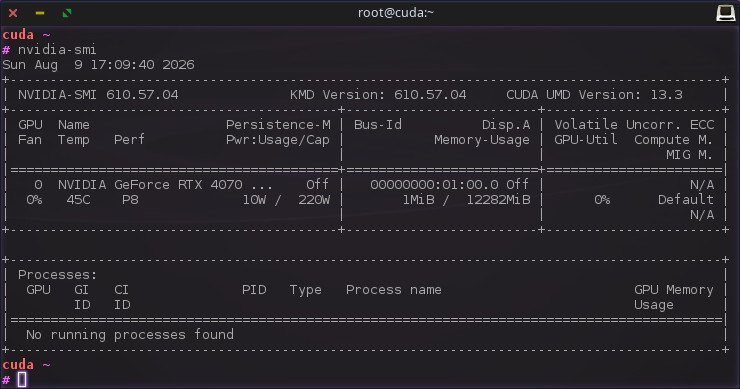
On Gentoo, there are two primary packages needed for a Nvidia CUDA
development environment, and they will pull in dependencies as needed based on any USE
flags. It is imperative for the drivers to be installed in order for GPU
hardware to be used. When this is done, you can confirm via nvidia-smi command and tool,
that displays information on the GPU hardware, and proceed compiling CUDA
code using nvcc with confidence, knowing you can run the CUDA binary on your
Nvidia CUDA GPU hardware, not just compile.
The following Gentoo packages are the only two packages that are required, others will be brought in as dependencies, and there are other optional Nvidia packages, but they are not required.
- dev-util/nvidia-cuda-toolkit - required
- x11-drivers/nvidia-drivers - required
emerge -qv nvidia-drivers nvidia-cuda-toolkit
The dev-util/nvidia-cuda-toolkit package is around 5.5GB in size and this cannot be reduced
as this is the CUDA API toolkit for all compute platforms, and unlike libtorch, it cannot be compiled or
reduced further. Although, you might be able to delete files after the fact of install, you do you. This
package and its binaries such as nvcc will not work with the latest GCC and require
downgrade to GCC 14.
gcc-config x86_64-pc-linux-gnu-14
The x11-drivers/nvidia-drivers package is going to build drivers from source, and as
such, the package requires linux kernel sources installed. Linux kernel sources are not installed as a
dependency and the package will fail with an error message. This package needs to be re-installed,
re-emerged, any time the kernel is updated.
libtorch

In the world of AI, PyTorch is one of the major frameworks for machine
learning (ML) and the engine under the hood is libtorch.so. Technically, it is far more
fractured than that and quite a challenge to package. Thankfully, this has been done in Gentoo, and is
maintained, although, that still leaves choice of USE flags and other pitfalls, at times,
it can fail to build, either initially or on update, requiring change of USE flags or
other intervention.
Before emerging sci-ml/pytorch package on Gentoo, you should set the following environment
variables based on your Nvidia CUDA GPU
hardware's compute capabilities. Otherwise, you
will build for all supported, which will take longer and create a larger file size installation than
necessary.
CUDAARCHS = "89"
TORCH_CUDA_ARCH_LIST = "8.9"/etc/portage/make.conf or a package subdir
per documentation; and can also be
done in a
custom profile.
emerge -qv pytorch
Recommended USE flags.
USE = "cuda memefficient numpy openmp"cuda being required, the others are optional to your liking. This is recommended to do
in /etc/portage/package.use or a package subdir per
documentation; and can also be done
in a
custom profile.
opencv

OpenCV is the defacto open-source standard library for real-time computer vision aka machine vision,
which is used heavily in AI and other applications such as robotics to given computers the ability to
process images as visual input. There is nothing special about installing this package on Gentoo, but
it does have a lot of USE flags and also CPU_FLAGS_X86 flags for further
optimizations.
emerge -qv opencv
Recommended USE flags.
USE = "contrib cuda cudnn eigen ffmpeg gif jpeg jpeg2k openexr opengl openmp png tiff truetype v4l wayland webp xine"cuda being required, the others are optional to your liking. This is recommended to do
in /etc/portage/package.use or a package subdir per
documentation; and can also be done
in a
custom profile.
Recommended processor specific CPU_FLAGS_X86 flags,
cat /proc/cpuinfo | grep <flag> to confirm processor support.
CPU_FLAGS_X86 = "avx avx2 f16c popcnt sse sse2 sse3 sse4_1 sse4_2 ssse3"/etc/portage/make.conf or a package subdir
per documentation; and
can also be done in a
custom profile.
ALE
The Arcade Learning Environment (ALE) was introduced in this
paper and is used for playing Atari 2600 games, primarily
by computers, but can also be played by humans alike. There is nothing special about this on Gentoo,
other than it is not presently packaged. There might be a ALE package in an overlay, but creating
Gentoo packages, ebuilds, is rather trivial and straight forward. The sci-ml/ale package is
available in the
overlaid Gentoo overlay,
and can be copied to your local overlay or other for usage.
emerge -qv ale
Recommended USE flags.
USE = "sdl"/etc/portage/package.use or a package subdir per
documentation; and can also be done
in a
custom profile.
Task Completed
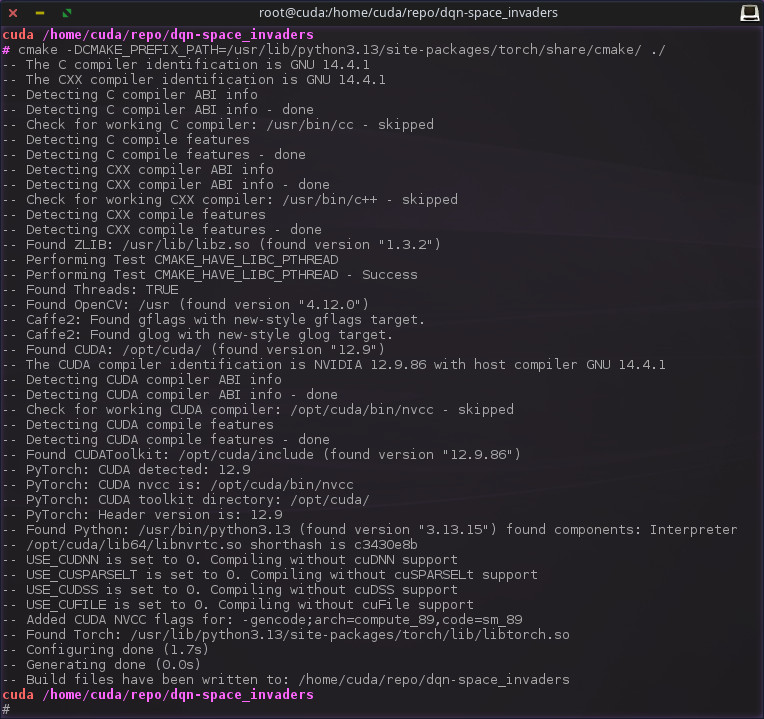
The final result, having CMake configure a C++ project using CUDA, libtorch, opencv and ale, although ale is not visible in the output, it is there. The following snippets of the output showing specific CUDA compute capabilities 89 for 8.9.
-- Found OpenCV: /usr (found version "4.12.0")
-- Found CUDA: /opt/cuda/ (found version "12.9")
-- The CUDA compiler identification is NVIDIA 12.9.86 with host compiler GNU 14.4.1
-- Found CUDAToolkit: /opt/cuda/include (found version "12.9.86")
-- PyTorch: CUDA detected: 12.9
-- PyTorch: CUDA nvcc is: /opt/cuda/bin/nvcc
-- PyTorch: CUDA toolkit directory: /opt/cuda/
-- PyTorch: Header version is: 12.9
-- Added CUDA NVCC flags for: -gencode;arch=compute_89,code=sm_89
-- Found Torch: /usr/lib/python3.13/site-packages/torch/lib/libtorch.so
The resulting compiled C++ program will not only run on Nvidia GPU hardware, as directed by code written using the libtorch C++ API, but the CUDA code is specific for the Nvidia GPU hardware in use, and no other.
Note that, per changes in Gentoo's sci-ml/pytorch package, specifically, no longer pulling
in sci-ml/caffe2, which allowed for libtorch_cuda.so and other shared objects
to reside in the common /usr/lib/ directory, instead of python specific in
/usr/lib/python3.13/site-packages. Because of such, it is now necessary to build specifying
this directory to CMake via CMAKE_PREFIX_PATH, which can be done via command line as
shown, and electively use Ninja backend instead of Make.
cmake -DCMAKE_PREFIX_PATH=/usr/lib/python3.13/site-packages/torch/share/cmake/ -G Ninja ./That is all, and while not a step-by-step guide, this should give anyone familiar with, or already running, Gentoo Linux an overview of how to get a C++ Nvidia CUDA development environment on Linux for AI development and research with the latest versions of libtorch aka PyTorch, OpenCV, and Arcade Learning Environment (ALE), with both libtorch and OpenCV having native CUDA GPU hardware support, and build using CMake.
If you are seeking a project to play with in your C++ Nvidia CUDA development environment on Linux for AI development and research, checkout the project being shown dqn-space_invaders, which can be modified for any Atari game; it is specific to Space Invaders via expandable usage of OpenCV.